NGINX.conf配置文件
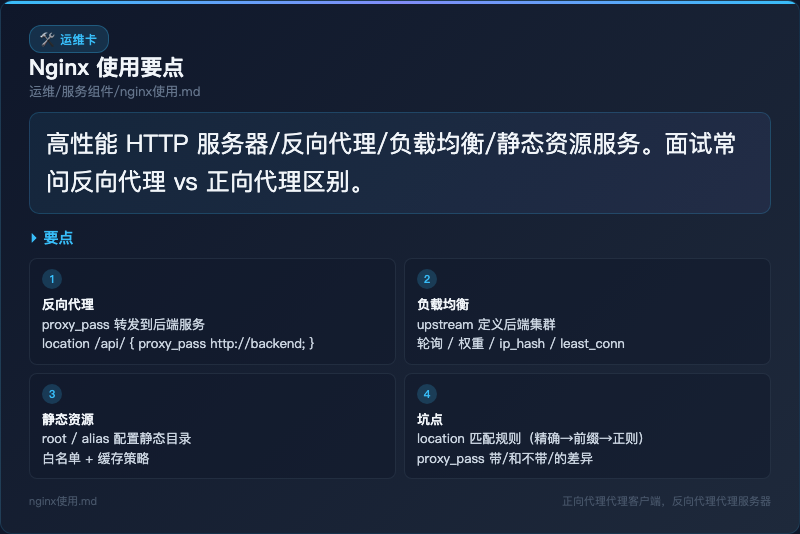
- 全局块:配置全局指令。如nginx进程pid存放路径、日志存放路径、配置文件引入等
- events块:配置nginx服务器与用户的网络连接。如进程的最大连接数、选择那种时间驱动模型处理连接请求、允许同时接受多个网络连接、开启多个网络连接序列化等
- http块:配置代、缓存日志定义等。可以嵌套多个server块。
- server块:配置虚拟主机的相关参数,一个http中可以有多个server
- location块:配置请求路由,以及各种页面处理情况
基本命令
重启:service nginx restart
配置模板
nginx
server {
    # 变量配置
    set $web_path "[前端资源文件]";
    set $back_end "[后端服务地址]";
    listen	8666;	#监听端口
    root $web_path;
    index index.html;
    #跨域配置
    add_header Access-Control-Allow-Origin *;
    add_header Access-Control-Allow-Headers X-Requested-With;
    add_header Access-Control-Allow-Methods GET,POST,OPTIONS;
    location ~* ^.+\.(jpg|jpeg|gif|png|ico|css|js|pdf|txt){
        root $web_path;
        expires 1m;
    }
    #URL映射
    location /mes {
        rewrite ^/b/(.*)$ /$1 break;
        proxy_set_header Host $host;
        proxy_set_header X-Real-IP $remote_addr;
        proxy_set_header X-Forwarded-For $proxy_add_x_forwarded_for;
        proxy_pass http:$back_end;
    }
error_page 500 502 /50x.html;
location    = 50x.html{
	root    html;
}
}
负载均衡配置
nginx
#默认轮询
#权重分配:weight权重越大分配得请求就越多

upstream name{
	server [服务器地址] weight=1;
	server [服务器地址] weight=2;

}

#哈希分配:根据客户端IP分配,如果分配给了一个IP,那么之后的请求也是分配给这个IP
upstream name{
	ip_hash;
	server [服务器地址];
	server [服务器地址];

}

#最少连接分配:判断那台服务器连接最少,就把请求分配给这台服务器
upstream name{
	least_conn;
	server [服务器地址];
	server [服务器地址];

}
静态服务器开启
nginx
server {
	listen       18687;
    server_name app;

    location /app{
    	root /;
        autoindex on;
    }

}
把app文件夹作为静态资源根目录,autoindex 是开启目录权限,默认是off;
tcp代理和负载均衡
nginx
# 流模块
stream {
    # 上游后端
    upstream backend{}
    # 监听事件
    server{}
}
安装第三方module
bash
# 下载第三方module

# 查看nginx已经安装的module,并复制出来
nginx -V
# 进入nginx安装包目录,重新编译nginx,安装的第三方module用--add-module
./configure --add-module=第三方module路径
make && make install
报错与解决:
bash
# ./configure: error: the HTTP rewrite module requires the PCRE library,缺少pcre-devel 与 openssl-devel
yum install -y pcre-devel openssl-devel
# 执行make报make: command not found
yum -y install gcc automake autoconf libtool make
# /configure: error: C compiler cc is not found,缺少gcc
yum -y install gcc
# /configure: error: SSL modules require the OpenSSL library
yum -y install openssl openssl-devel
遇到问题
- 开启静态服务器出现路径错误问题
- 原始配置
nginx
location /videos/ {
    root /Users/wu-mb/opt/nginx/www/videos/;
    autoindex on;
    autoindex_exact_size off;
    autoindex_localtime on;
}- 问题 1:nginx报
/Users/wu-mb/opt/nginx/www/html/videos/videos/index.html" is not found - 解决 1:使用
alias指令替代了root,并且alias允许你直接使用 /videos/ 路径,而不会重复添加路径前缀。
nginx
location /videos/ {
    alias /Users/wu-mb/opt/nginx/www/videos/;
    autoindex on;
    autoindex_exact_size off;
    autoindex_localtime on;
}
问题 2:alias的路径拼接错误
解决 2 :因为
alias指令在Nginx中的工作方式与root不同。当使用alias时,路径拼接的方式非常依赖于alias后面路径的格式。如果路径末尾没有/,Nginx会将请求路径的最后一部分与alias路径直接拼接,这就可能导致路径错误。
nginx
location /videos/ {
	# 错误配置,最后的结果是/Users/wu-mb/opt/nginx/www/video,
    alias /Users/wu-mb/opt/nginx/www/videos;
}
nginx
location /videos/ {
	# 正确配置,加上‘/’
    alias /Users/wu-mb/opt/nginx/www/videos/;
}- 方向代理其他网站。
某些 HTTPS 网站可能需要 SNI 来区分不同的虚拟主机。你可以在 Nginx 配置中明确设置 SNI
nginx
server {
    listen 80;
    server_name your-domain.com;

    location / {
        proxy_pass https://目标网站.com;
        proxy_ssl_server_name on;
    }
}